
Bus Passenger Screens: The Software Behind the Display
A screen on a bus looks simple from the aisle. The route name is there, the next stop changes, and an advertisement fills the gap between stops. That picture only holds if the software already has the route, the player already has the files, and someone can tell a dead unit from a working one without standing in the depot with a laptop.
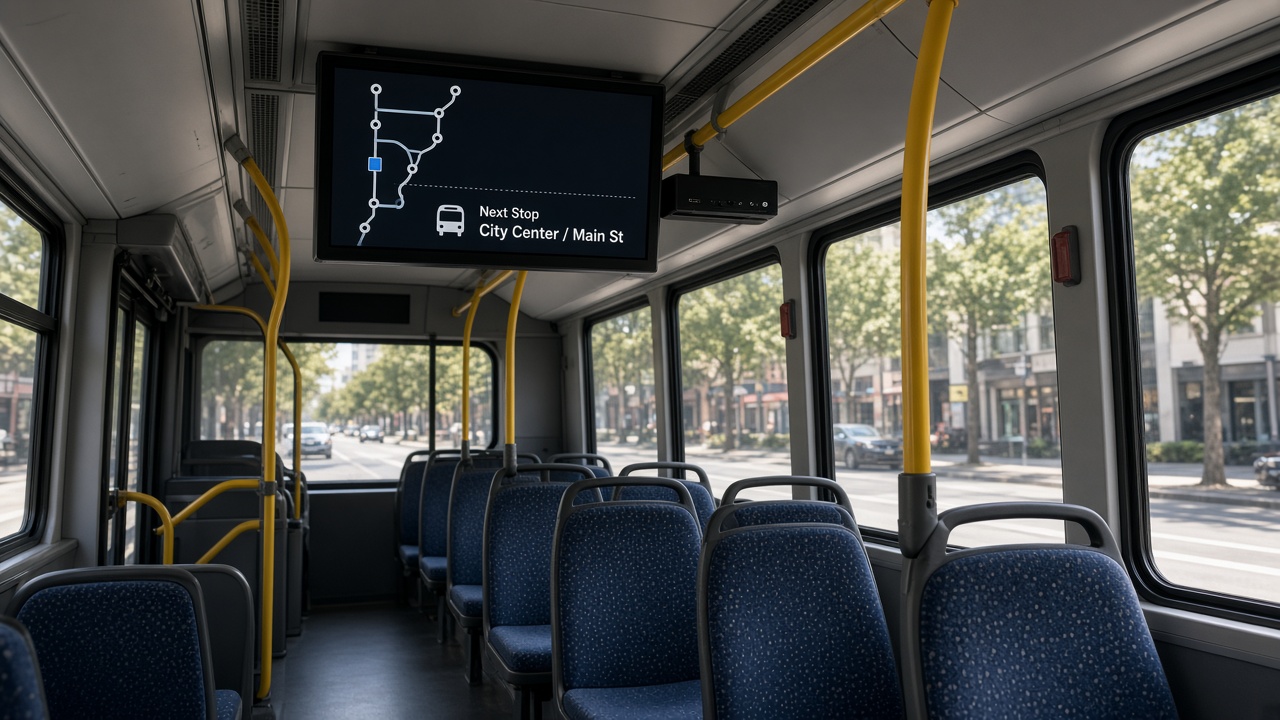
The display is the last step
Operators often start with the panel size and the brightness. Those matter. A screen that washes out in daylight, or one that is mounted where standing passengers block it, fails before any software is judged. The decision that decides the second month is different. Who changes the route list, who changes the advertisement, and what the screen shows when the bus is between towers.
A shop display can wait for the next Wi-Fi upload. A bus cannot. Passengers read the next stop as a fact. If the loop is yesterday’s route, or the panel is stuck on a logo because the player is still trying to reach a server, the screen becomes a complaint. The software has to treat the vehicle as a place that leaves the network on purpose.
What the software actually has to do
Passenger information and advertising are often the same screen and two different jobs. Mixing them in one folder of videos is how fleets end up with the wrong route on the wrong bus.
- Route and next stop. The list has to match the service that bus is running today, including a short turn or a changed terminus. A static video of last month’s route is not a passenger system.
- A holding loop. Between stop announcements, the screen can run operator messages or paid spots. Those spots need a start date and an end date, or a finished campaign keeps playing.
- A fallback. If the route file is missing, the screen should show a calm operator message, not a setup wizard or a home screen.
- A language the rider already uses. If two languages are required, they need a layout that still fits when the stop name is long. Cramming both into a template designed for one line is how text gets cut off.
Maram’s digital signage software is the content side of that job: what plays, on which screens, and when it changes. It does not replace a transport scheduling system. It publishes what the passenger should see once the route decision has already been made.
Offline first, update second
Design the player so a full day of content lives on the device. The route layout, the stop list and the advertising loop should start from local storage when the ignition comes on. The network’s job is to deliver the next package, not to paint every frame.
That package is usually small if it is planned that way. A changed stop list and a new still advertisement do not need a cinema file. Heavy video is what fills a depot upload window and what fails halfway when twenty buses try to download the same clip at once. Publish a version, let each player confirm it has the files, and keep the previous version until the new one is complete. A half-written playlist is worse than yesterday’s playlist.
Depot Wi-Fi is enough for many fleets. The bus returns, the player connects, the package lands, and the next departure already has it. A SIM is the other path, for a message that must change while the bus is out. Cellular is covered in the companion note on SIM-card Android boxes. Use it when the message cannot wait for the depot, and budget the data. Do not assume every screen needs a live tower to stay useful.
The player has to behave like a fixture
An Android box on a bus is not a living-room stick. Power drops when the vehicle shuts down. The unit vibrates. The HDMI lead gets nudged during cleaning. The screen that matters is the one that comes back to the signage app by itself after that, without a remote control and without a technician on the vehicle.
Ask for a player that boots into the published app, hides the system bars, and resumes the local playlist if the network is absent. Commercial panels and commercial players are built for that duty cycle. A consumer television and a consumer stick often are not: they look for a setup screen, they sleep, or they forget the last input. The same caution is in the signage cost guide. On a bus the cost of the wrong player is not only the unit. It is a missed departure while someone climbs a seat to press a button.
Someone has to see the fleet from a desk
Twenty buses with twenty screens will not be checked by walking the yard every morning. The office needs a list: which player booted, which one has the current package, which one has not been seen since yesterday. That is device management, not the content calendar.
DCM Console is the place Maram uses for that list. Lock the player to the signage app, push a package, and see a unit that stopped reporting. Content people should not need a second vendor to learn that a screen is dark. Hardware, the playlist and the device record belong in one conversation, the same way a retail fleet does when the player and the CMS are supplied together.
Name the units after the vehicle, not after a serial number only the installer remembers. When a driver says the front screen is wrong, the desk should find that bus without a spreadsheet on the side.
What to prove before the fleet order
One fitted bus tells you more than a demo in an office. Run it for a week of real shifts.
- Cold start with no network. The last good route and the last good loop should appear without a login.
- A route change published at the depot, then a second change sent on the road if you plan to use a SIM.
- Power removed mid-playback, then restored. The app should return. The system setup screen should not.
- A bright afternoon on the actual mount, read from a standing passenger’s position.
- One failed player. The desk should see it without a phone call from the driver.
If that week needs a technician on the vehicle every morning, the software is not ready for the rest of the fleet. Fix the boot, the cache and the naming before you multiply the install.
Frequently asked questions
Fit the screen to the service, then scale it
Buy the panel the aisle can actually read. Put an Android player on it that boots into the published app and keeps a full day of files on board. Give the office one place to change what plays and one place to see which bus has fallen off the list. Prove it on one vehicle before the rest of the yard is fitted.
Plan a bus screen pilot
Tell us how many vehicles, whether the message must change on the road, and who will publish routes and ads. We reply with a clear pilot proposal within one business day.